
# AI Assistant
The ability to ask questions to an AI system using security policy rules as contextual input offers significant advantages in the management and understanding of security configurations.
For information about AI integrations visit AI assistant in the Policy section
# AI assistant Configuration settings
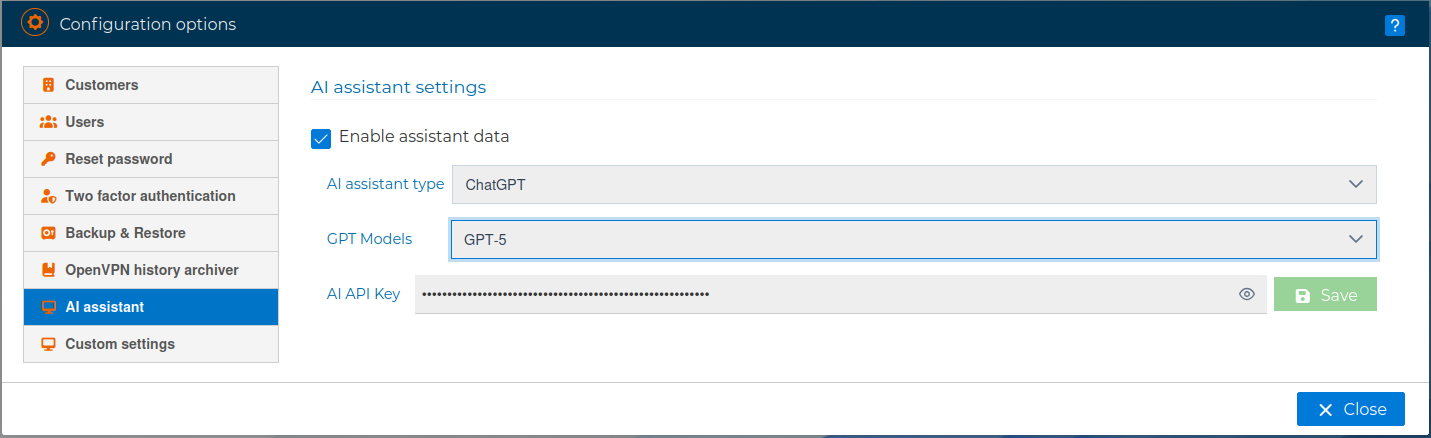
FWCloud provides a dedicated configuration area for enabling and customizing the integrated AI assistant. These settings allow administrators to control how the AI assistant operates and which underlying model is used.
The following configuration options are available:
Enable Assistant Data
This option allows the AI assistant functionality to be enabled or disabled globally. When enabled, the system can provide AI-assisted features such as contextual explanations and responses based on available configuration data. Disabling this option prevents the assistant from accessing or processing any data.
AI Assistant Type
This setting defines the AI assistant provider used by the system. In the current configuration, ChatGPT can be selected as the AI assistant. This determines which AI service is responsible for processing user queries and generating responses.
GPT Model Selection
Administrators can select the GPT model used by the AI assistant. Different models offer varying levels of performance, accuracy, and resource consumption. The available options include:
GPT-5: A full-capability model designed for advanced reasoning, detailed explanations, and complex contextual analysis.
GPT-5 mini: A lighter model optimized for faster responses and reduced resource usage while maintaining good overall accuracy.
GPT-5 nano: A highly optimized model intended for basic queries and minimal resource consumption.
Selecting an appropriate model allows administrators to balance response quality, performance, and operational cost according to their environment’s requirements.
AI API Key
This field is used to configure the API key required to authenticate with the selected AI service. The key enables secure communication between FWCloud and the AI provider. The API key is stored securely and is not displayed in plain text once configured.
After adjusting the desired settings, changes can be applied by saving the configuration. These settings determine how the AI assistant behaves and which capabilities are available within the platform.