
# Simultaneous access
FWCloud is a web-based application that can be accessed from any location through a standard web browser. The system allows multiple users to connect simultaneously; however, to preserve data integrity, only one user may hold editing control for a FWCloud at any given time.
The first user to access the cloud is granted exclusive control.
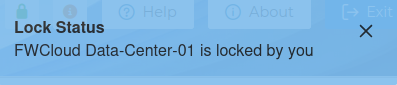
This user is able to perform all available actions, including data modification and installation tasks.
In the top bar a green close padlock indicates this situation

Any additional users who access the to the same cloud of the application while it is locked receive a notification identifying the user who currently holds the lock. This also implies when the same user access the that cloud from a different location.
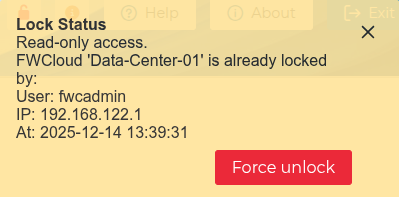
This message is intended to be as informative as possible and may include the name of the client VPN connection when the IP address from which access is made is registered in FWCloud object database.
These users are granted limited access in read-only mode. In this mode, no data can be modified and no installations can be performed. This mechanism prevents multiple users from saving changes concurrently. It is indicated by the red open padlock icon.

The user holding the lock may release it by logging out of the application or by switching to a different cloud.
In addition, any user with limited access may forcibly release the lock and acquire editing control by clicking the  button that appears in the information message. This option is intended for situations in which the user holding the lock is unavailable and cannot release it in a timely manner.
The user may click on the padlock icons at any time to display the information messages again and, if necessary, force the unlocking of the cloud.